Hidden until
something needs you.
An island at the top of Windows for your coding agents, your music and your tools. Free and open source.
The island, live
A moving picture of a Windows screen. A small black island slides down from the top edge. It shows a coding agent asking for permission, with Deny and Allow buttons, then a volume level, then a music player.
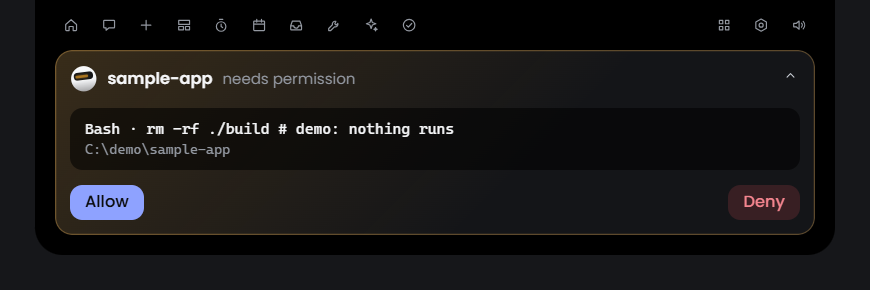
Your coding agent wants to run a command. The island slides out, you press Allow, and you never leave your work.
You change the volume. The island shows the level for a moment, then goes away again.
A song starts. The player is one glance away, with controls for any player Windows knows about.
Small on purpose.
Lintel is built around four things: efficiency, optimisation, privacy and necessity.
- 0.5%
- It rests when you rest.About half a percent of one processor core while it waits, hidden and idle, in the audit of this release. The core is Rust, with a light web view for the interface.
- 6px
- It stays out of your way.A strip six pixels tall is all that waits at the top of your screen. Point at it and the island slides out. Look away and it leaves.
- 0
- Your data stays yours.On a fresh install Lintel calls no server at all. No account, no telemetry. Your keys are kept in Windows Credential Manager, and nothing is approved, sent or deleted without your click.
- 38
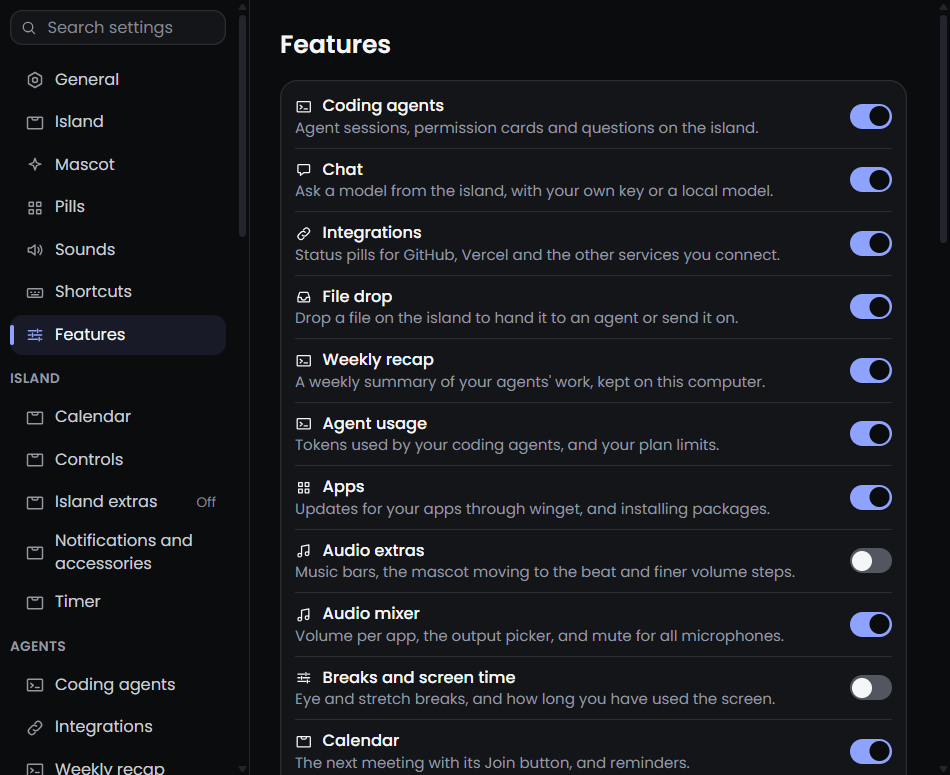
- Carry only what you need.Every feature has its own switch. One that is off loads nothing: no hooks, no timers, no threads, no windows.
The Mac has a shelf of notch apps. Windows has very few.
On a Mac you can choose between NotchNook, The Boring Notch, Alcove, DynamicLake, MediaMate, TopNotch, NotchBar, NotchFlow, DropNotch, Coucou and Vorssaint. They are good work, and they showed what a notch can do.
Windows has a handful, such as DynamicWin, Notchify, Venu and Dynamic Edge, mostly for media and widgets. None of them does all of this. So I built Lintel. It grew from the Windows edition of Coucou, brings the best ideas of Vorssaint and Boring Notch to Windows, and adds its own. It is an independent project, and it thanks all three.
It is made for Windows 10 and 11 first. It is not a port waiting for attention. And the name: a lintel is the beam across the top of a door or a window. Lintel sits at the top of your Windows.
See it at work.
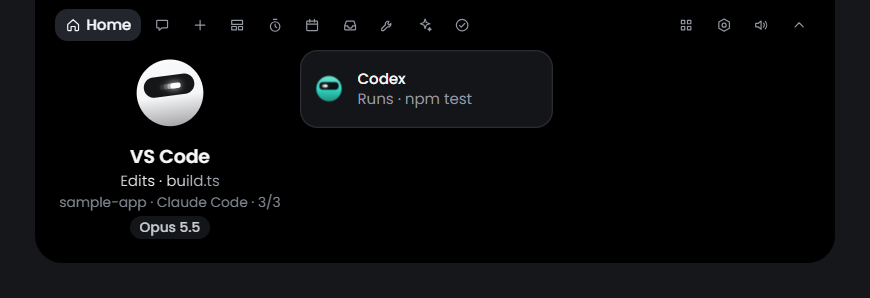
A permission card, the Home view with two agent sessions, and the page where every feature has its switch.
One island. Eleven groups of tools.
Everything is a glance away, and each tool can be switched off.
Agents
Sessions, permission cards and questions from your coding agents, with usage and a weekly recap.
Chat
Ask a model from the island, with your own key or a model on your PC.
Media
The song that is playing, and the volume of each app.
Island
Calendar, reminders, timers, notes and quick controls, one tab each.
System
Volume and brightness levels, battery, displays, keep awake and a system monitor.
Capture
Screenshots, an editor, scrolling capture and screen recording.
Files
A shelf to park files, and a drop on the island to hand a file on.
Tools
Clipboard history, a cleaner, a command bar, dictation and a voice assistant.
Apps
Updates and installs for your apps, through winget.
Input
Text snippets, and rules for keys, mouse buttons and scrolling.
Windows
Snap windows to halves, thirds and quarters with shortcuts.
The whole list
All 38 features in plain words, with what is off by default.
Built in the open.
Lintel is open source, and everyone is welcome to help: translate it, test it on your PC, fix a bug or build a feature. A feature is one folder, and there is a guide and a short list of rules.
Free, and yours to change.
Version 1.0.0 for Windows 10 and 11. It installs for your account, without administrator rights.